
Communication Infrastructure · ICT Infrastructure

Communication infrastructure designed for voice quality, video reliability, and a documented handover

Communication infrastructure running IP telephony at a multi-site office desk

IP telephony, video conferencing, paging, and unified messaging, designed and delivered as one layer.

Your communication infrastructure carries every call, every meeting, and every alert across your building and between your sites. Communication infrastructure services cover the full scope: IP telephony, video conferencing, paging and intercom, and unified messaging, designed together on a QoS-segmented network so each stream gets the priority it needs. Cabling is channel-tested, every endpoint is commissioned and labelled, and the handover includes the dial plans, configurations, and test records your team needs to run the system on its own.

SIP (RFC 3261)DiffServ QoS (RFC 4594)Call-quality tested before cutover
ICT infrastructure services overview
A certified communication systems engineer replies within one business day, not a sales rep.
What it is

What communication infrastructure services include

Communication infrastructure is the active layer that carries voice, video, and alerting across your network: the IP PBX, the video conferencing endpoints, the paging amplifiers, the intercom controllers, and the unified messaging platform that ties them together. A complete scope covers the design, the equipment selection, the QoS configuration on the underlying network, the installation, the commissioning, and the testing from the first site survey through to a documented handover that includes your dial plans, line groups, and as-built records.
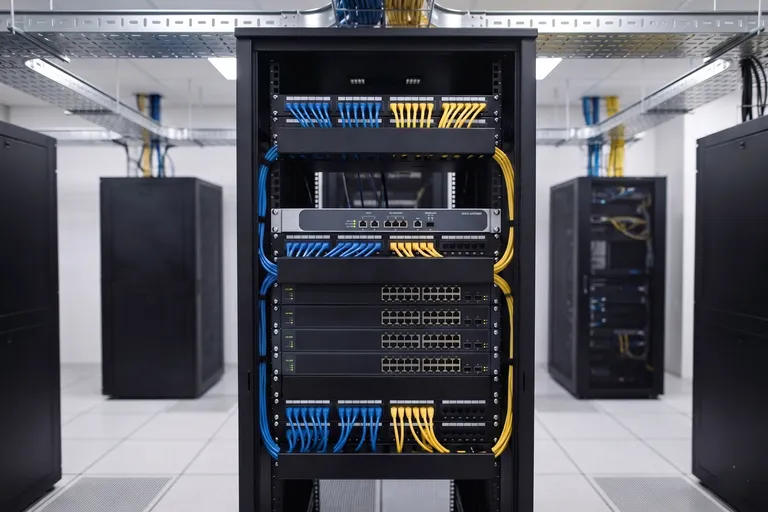
SIP voice gateway and PoE switch in a communication infrastructure rack

IP telephony

On-premise or hosted IP PBX with desk phones, softphones, and SIP trunks sized for your call volume.

Video conferencing

Meeting room and personal endpoints, from huddle rooms to large boardrooms, with cloud bridge integration.

Paging and intercom

IP paging amplifiers and zone speakers for public address, with emergency override capability.

Intercom and door communication

IP intercoms linked to access control, with audio and video entry at reception and secure zones.

Unified messaging

Voicemail-to-email, hunt groups, auto-attendant, and presence integrated across phone and desktop.

QoS and network integration

Voice and video traffic segmented and prioritised on the network so call quality is not left to chance.

The dial plan, call routing logic, and QoS policy are agreed and documented before any equipment is ordered. Nothing is procured until the design is confirmed.

Risks

What goes wrong with enterprise communication infrastructure

Four failures that appear after the system goes live. Each one is a design or configuration decision, not bad luck, and each is preventable before a single phone is installed.

Risk 01

Poor voice quality and dropped calls

VoIP calls degrade when voice packets share the network with bulk data traffic and compete for bandwidth without priority. Jitter, latency, and packet loss show up as choppy audio, echo, or calls that drop mid-sentence. Most telephony problems are network configuration problems in disguise.

150 ms
the ITU-T G.114 one-way delay threshold exceeded by networks with no voice QoS policy.
Prevention

Design QoS into the network before the phones arrive. Voice traffic is tagged and prioritised at the switch so call quality meets ITU-T G.114 targets regardless of how busy the data network is.

Specification

Technical specification

Your communication infrastructure is designed to recognised standards, not to a single vendor's default settings. Telephony follows ITU-T G.114 latency targets and SIP RFC 3261; video conferencing follows H.323 and SIP interoperability profiles; cabling is channel-tested to TIA-568-D (2018) and ISO/IEC 11801:2017. QoS is designed into the network before any endpoint is installed, and every system is commissioned, tested, and documented before handover.
Standards
ITU-T G.114 (voice latency), SIP RFC 3261, H.323, TIA-568-D (2018), ISO/IEC 11801:2017 (3rd ed.), IEC 62443 (OT segmentation)
IP telephony
On-premise or hosted IP PBX, SIP trunking, desk phones and softphones, auto-attendant, hunt groups, voicemail-to-email
Video conferencing
Room systems and personal endpoints, SIP and H.323 interoperability, cloud bridge (Teams, Zoom, Webex) integration
Paging and intercom
IP paging amplifiers, zone speaker systems, public address with emergency override, IP intercom with access control integration
QoS and network
DSCP voice and video marking, priority queuing at edge and core switches, jitter and latency validated to ITU-T G.114
Segmentation
Dedicated voice and video VLANs, separated from corporate LAN, IEC 62443 applied where OT systems are involved
Testing and validation
Call quality tested to ITU-T G.114 targets; video endpoints commissioned to vendor specifications; cabling channel-tested with Fluke DSX
Handover documentation
As-built wiring diagrams, exported dial plans and trunk configs, ring group and line assignments, QoS policy records, test reports
Warranty
Manufacturer hardware warranty, extended cover activated at certified handover
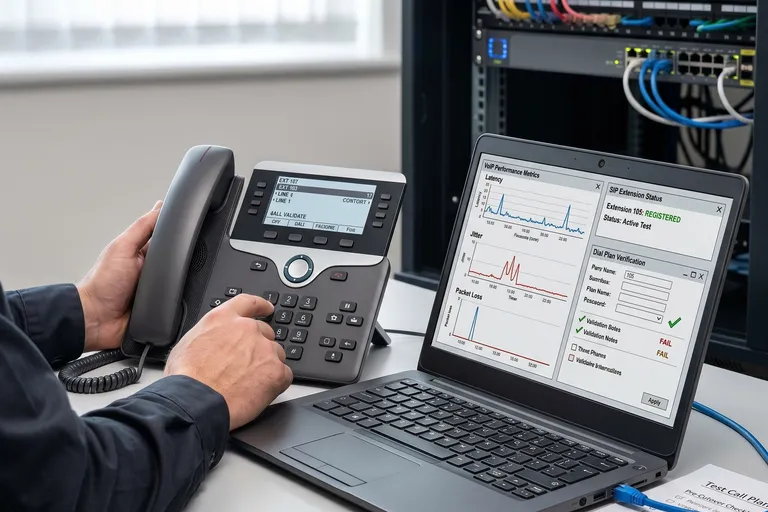
Engineer testing IP telephony extensions before cutover
Exported dial plans, trunk configurations, and as-built records are included as standard in editable formats your team owns.
Cost factors

What affects the cost of a communication infrastructure project

The cost of a communication project moves with the number of extensions and sites, the type and size of meeting rooms, paging zone count, whether an on-premise or hosted PBX model fits your requirements, and how much existing equipment can be reused. We publish the drivers, not a price, because a real figure comes from your design.

Open-plan office with IP telephony extensions across multiple sites
Extension count and site count

More users and more sites mean more endpoints, more SIP trunks, and more configuration time.

Meeting room and boardroom count

Larger rooms need higher-grade codecs and room controllers; more rooms multiply that cost.

Paging zone count and area

More zones, more amplifiers, and more speaker runs add to the cabling and equipment scope.

On-premise vs hosted PBX

On-premise gives you more control at a higher upfront cost; hosted reduces capital but adds a recurring subscription.

Redundancy and failover requirement

Redundant PBX servers, dual trunks, and tested divert plans cost more and remove single points of failure.

Existing vs new infrastructure

Reusing serviceable cabling and endpoints reduces cost; a full refresh or new containment raises it.

Standard exclusions(not included in a cabling quote)
SIP trunk and PSTN line recurring charges
Cloud video conferencing platform subscriptions (Teams, Zoom, Webex)
Hosted PBX or UCaaS subscription fees beyond the initial term
Structured cabling civil works (containment, builder's work)
End-user mobile devices
Annual maintenance contract (AMC)
Process

How a communication infrastructure project is delivered

Every project runs in five phases. No phase starts until the previous one is complete and documented.

01

Design and survey

Your project starts with a survey and a clear set of requirements: extension count, room types, paging zones, and availability target. From that comes a dial plan outline, a QoS policy, a cabling and equipment schedule, and confirmation of the PBX model that fits your needs.

No equipment is ordered until the design, dial plan outline, and QoS policy are approved.
02

Procurement and pre-configuration

Hardware and licences are ordered. Where possible, PBX base configuration, dial plans, and trunk settings are built off-site and reviewed before anything reaches your building.

Dial plans and trunk configurations are built and reviewed before installation begins.
03

Installation and commissioning

Endpoints, amplifiers, and controllers are installed and commissioned. Each device is labelled, each extension is assigned, and every paging zone is verified against the design.

No device is left unlabelled or unassigned at the end of any day.
04

Testing and QoS validation

Call quality is tested against ITU-T G.114 targets. Video endpoints are tested for interoperability. Paging zones and intercom paths are tested. QoS performance is validated under load.

Call quality and video interoperability are proven before any production traffic moves.
05

Cutover, handover and documentation

The cutover is run in a planned window. Handover is not signed until exported dial plans, trunk and ring group configs, as-built wiring diagrams, and test reports are produced and your team is walked through them.

Not signed off until every document is accepted and your team is trained.
Key comparison

On-premise PBX, hosted PBX, or UCaaS: which model fits your business?

Your PBX model determines your upfront cost, your control over the dial plan, and your monthly run cost.

Compare options
Select a category
Upfront capital cost
Higher server and licences bought upfront
Lower hardware optional, licences per seat
Lowest o dedicated hardware
Ongoing subscription cost
Maintenance contract only
Per-seat monthly fee
Per-seat monthly fee plus platform plan
Control over dial plan
Full, your team or your contractor owns it
Most settings available, some limits
Limited by the platform
Call quality dependency
Your LAN and SIP trunk quality
Your internet link quality
Paging and intercom integration
Full integration with IP paging and intercom
Possible via SIP, depends on provider
Limited, varies by platform
Best for
Larger sites needing paging, intercom, and complex dial plans
Multi-site businesses wanting managed telephony
Businesses already on Microsoft 365 or Google Workspace

For most multi-site businesses, a hosted PBX gives you managed telephony without the capital cost of an on-premise server, at the cost of a monthly per-seat fee and a dependency on your internet link. If you need deep integration with IP paging, intercom, and a complex dial plan, an on-premise system gives you more control. If your users are already on Microsoft 365 or Workspace, a UCaaS platform may remove the need for a separate PBX entirely.

Cross-service

What else connects to your communication infrastructure

Your communication systems share the same network and cabling as your security and building systems. These connections belong in the design from the start.

Structured cabling

Every IP phone, speaker, and intercom runs on your structured cabling. The two are designed together so PoE, bandwidth, and category ratings match what the communication systems need.

View structured cabling

Network infrastructure

Voice and video traffic must be QoS-segmented on the underlying network. Communication and network infrastructure are designed as one layer.

View network infrastructure

Access control and intercom

IP intercoms connect to access control readers and door controllers. Designing both systems together avoids wiring duplication and ensures the access control panel and the intercom controller share the right network segments.

View ELV systems

Life safety and fire alarm integration

Emergency paging override is triggered by the fire alarm panel. The paging design must account for the integration before installation.

View life safety services
Relevant industriesHealthcareHospitalityEducationCorporate officesBanking and finance
FAQs

Frequently asked questions

The questions IT and facilities teams ask about communication infrastructure before going to tender.

It depends on what you have and what you need it to do. We start with a survey of your current PBX, endpoints, and cabling. Where the hardware is serviceable and the dial plan is sound, we can upgrade in place. Where the system is end-of-life, analogue-only, or undersized for your plans, a replacement costs less over time than extending it. You get an honest assessment before any spend.

By designing QoS into the network before the phones arrive. Voice packets are tagged with DSCP markings and prioritised at the switch and router, so call quality meets ITU-T G.114 latency and jitter targets regardless of data traffic. QoS is validated under load before handover, not assumed.

Only if the system is not designed for it. An on-premise PBX keeps working on your LAN through an internet outage, though external calls on SIP trunks will fail without a failover trunk. A hosted PBX needs the internet link to function. We design the failover approach to match your availability requirement before procurement, so you understand the dependency before the system is ordered.

Yes, and it must be planned at design stage. Emergency paging override is triggered by the fire alarm panel, and the wiring and relay logic need to be in scope before installation begins. We coordinate with your fire alarm contractor on the interface to ensure the integration works and is documented.

A complete record. That means exported dial plans, trunk and SIP configurations, ring group and hunt group assignments, paging zone maps, as-built wiring diagrams, and test reports. Your team also gets a walkthrough. You should be able to add extensions, change ring groups, and troubleshoot calls without calling us back for the basics.

For a single-site telephony and paging project of moderate size, four to eight weeks from approved design to handover is typical. Multi-site deployments or projects that include video conferencing rooms and intercom integration run longer. The dial plan review and design phase is where your real timeline is set.

Honest fit

When we are not the right choice

We will tell you directly when your project is not the right fit.

Your tender is scored on lowest price alone

We will not remove QoS design, call quality testing, or documentation to match a cheaper number. A proposal that leaves those out is a different scope, not a better deal.

You run one small office with a simple off-the-shelf phone system

For a handful of extensions and a consumer VoIP solution, your own IT team or a local reseller will deliver it faster and for less than we will.

You want a locked-in, single-vendor proprietary stack with no documentation

We design to open standards and hand over exported configurations and dial plans. If a closed system that only the original vendor can change is the goal, we are not the right fit.

You're a good fit if…

You are a good fit if your communication infrastructure spans multiple sites or multiple systems telephony, video conferencing, paging, and intercom on shared infrastructure, where call quality and availability matter, where the system needs to integrate with access control or fire alarm, and where a documented handover your team can run is non-negotiable.

Book a communication assessment

A scope to test communication proposals against before you tender

A communication assessment gives you a dial plan outline, a QoS policy, and an indicative budget range for your site so procurement compares proposals that cover the same work.

A certified communication systems engineer contacts you, not a sales representative
Response within one business day
An indicative dial plan outline and budget range in writing within five business days of the site visit
No obligation. If we are not the right fit, we will tell you directly

Tell us about your project

Response within one business day. No obligation.